Tag: xampp

  • 使用XAMPP在电脑中运行WordPress–安装篇

    XAMPP是一款PHP环境集成的软件,集成的环境有:Apache + MariaDB + PHP + Perl,备注:之前都是Mysql,2015年10月19号发布的最新版的数据库是:MariaDB,这里是MariaDBd百度百科。

    使用XAMPP可以轻松的在你的电脑里搭建完美的WordPress运行环境,而且XAMPP是跨平台的产品,各位只要在XAMPP官方下载符合自己要求的XAMPP程序即可:

    1

    Windows的用户下载第一个即可,下载之后安装,这里是中文版的社区:https://www.apachefriends.org/zh_cn/index.html

    安装页面很简单,但是有几个需要注意的地方:

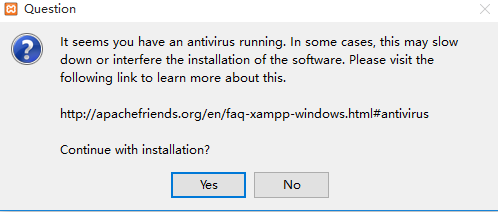
    1,XAMPP可能会和某一些杀软有冲突,安装速度如果非常慢,建议关掉杀毒软件再安装;
    2

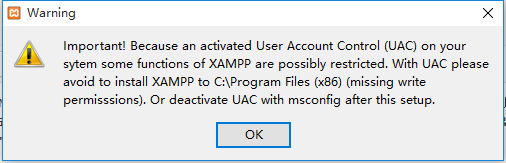
    2,为了避免出现不必要的麻烦,请不要把XAMPP安装再系统盘中,安装的目录页不要用中文,直接在D盘下建一个xampp当做XAMPP的安装目录即可;
    3

    3,4

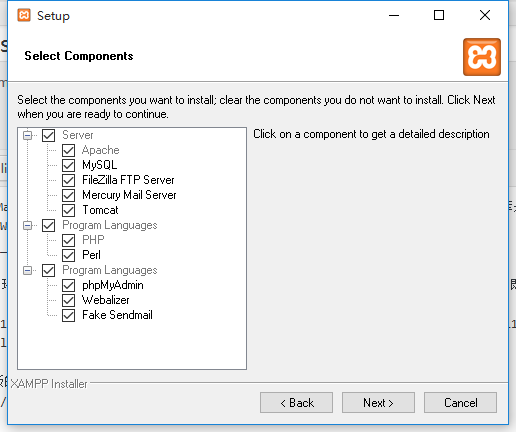
    XAMPP包含的服务很完整,这个是默认的,其实tomcat是JSP的,可以不安装,各位根据自己的需求来安装就行了,如果您不知道需要安装哪些,可以看下面的这张图:
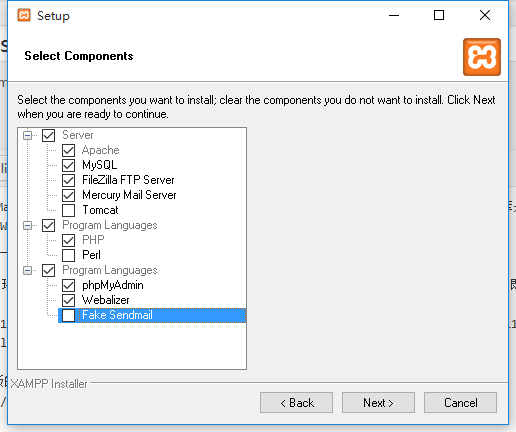
    5。

    到这一步,XAMPP就已经安装好了。

    启动XAMPP,就看到了XAMPP的控制面板:
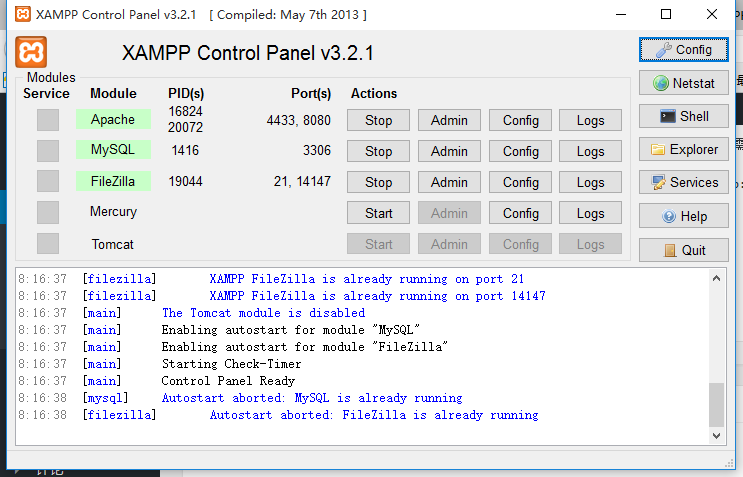
    6

  • XAMPP错误: Apache shutdown unexpectedly解决办法

    这是Wopus的第一篇XAMPP的文章:使用XAMPP在电脑中运行WordPress–安装篇;

    XAMPP安装好之后启动,但有些用户在启动apache的时候会出现:

    16:50:25 [Apache] Status change detected: running
    16:50:26 [Apache] Status change detected: stopped
    16:50:26 [Apache] Error: Apache shutdown unexpectedly.
    16:50:26 [Apache] This may be due to a blocked port, missing dependencies,
    16:50:26 [Apache] improper privileges, a crash, or a shutdown by another method.
    16:50:26 [Apache] Press the Logs button to view error logs and check
    16:50:26 [Apache] the Windows Event Viewer for more clues
    16:50:26 [Apache] If you need more help, copy and post this
    16:50:26 [Apache] entire log window on the forums

    出现这个错误的原因是,XAMPP的设置的常用端口,包含http和https的端口都被占用了,解决办法:

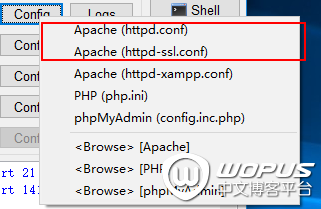
    1,打开XAMPP的控制面板,找到:Apache的Config文件:

    7

    2,先打开 Apache(httpd.conf),找到:Listen 80 替换成:Listen 8080;找到:ServerName localhost:80 替换成:ServerName localhost:8080;保存。

    3,再打开Apache(httpd-ssl.conf),找到:Listen 443 替换成:Listen 4433;找到:和 ServerName localhost:443 替换成:和 ServerName localhost:4433;保存。

    4,关闭XAMPP,重新打开,再启动Apache就不会有问题了。